
Student management software that keeps every record in one place
Identity, contacts, enrollments, payments, levels and documents: each student has one record, opened according to each person's access.
Pro plan free for 30 days · no credit card · no commitment
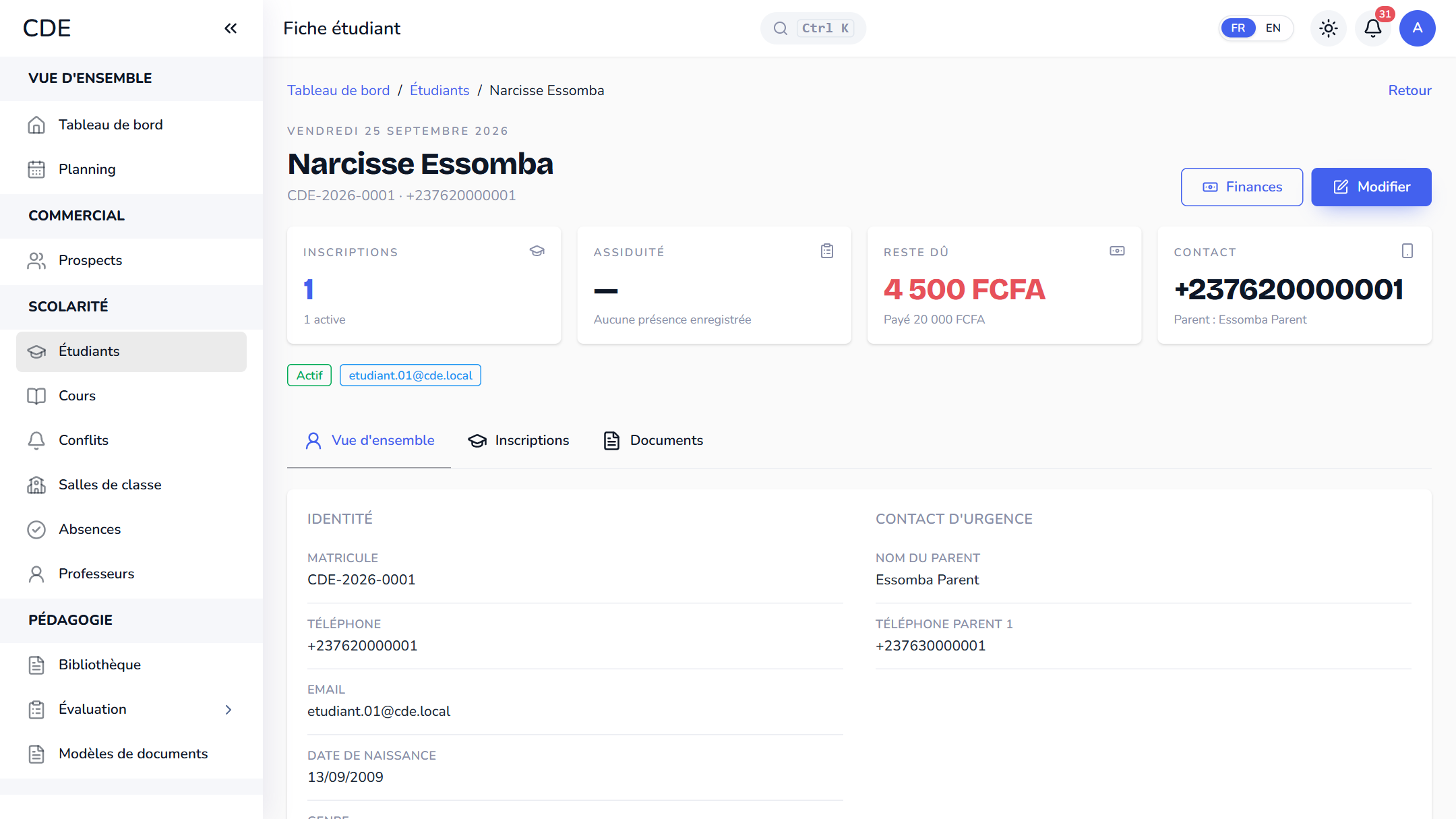
One complete record per student
Name, phone, WhatsApp, email, date of birth, the parents to contact: everything you need to reach a student and their family is on one record, with notes and a status (active, inactive, suspended or graduated). Four figures at the top sum up the situation: enrollments, attendance, balance due and contact. The detail opens in tabs:
- Enrollments: sessions followed, teacher, room, attendance and status.
- Levels: the history of levels validated session after session.
- Documents: certificates and contracts generated for the student.
- Messages: what was sent to the student and their parents, once a sending channel is connected.
An automatic registration number, never reused
When the record is created, the student gets a number like CDE-2026-0001: your center's prefix, the year, then a counter that restarts at 0001 every year. The number never changes and is never given to another student, even if the record is deleted. In the list, you find someone by name, number or phone, and filter by session or status.
Student finances: paid, balance due, late installments
The Finances page shows on one screen how much a student has paid and how much they still owe: total collected, balance to pay, late installments, and a payment history with the method (cash, Mobile Money, card, bank transfer, cheque) and a printable receipt. Payments are entered at the cash desk, and the amounts recalculate themselves, never by hand.
A portal for the student
Where your plan includes the portal, a student whose record is linked to an account gets their own space: current, upcoming and finished courses, next classes, progress, attendance and what is left to pay. With online courses, it also holds course materials, quizzes and certificates. The portal is view-only: students cannot change anything there. From the record, a button sends the student, if they have an email address, a message to set up their login.
Excel import and role-based access
Save your spreadsheet as a CSV file and upload it with the template provided: a preview flags each row to fix before you confirm, and duplicate phone numbers or emails are skipped.
With the default roles, reception creates and edits records, teachers view them read-only, and only the administrator deletes: the record is archived and its payments stay in the cash desk journal.
Frequently asked questions
Which software should I use to manage students at a training center?
You need a tool that ties the student record to enrollments, attendance and payments, so nothing is typed twice. Palatryx brings the three together on one record, with a free trial and no credit card so you can test it with your own students.
Can I import my students from Excel?
Yes, as a CSV file with the template provided: first name, last name and phone number are required. Enrolling a student in a session and linking them to a company are done afterwards, on each record.
Can I reach a student's parents from the record?
The record keeps the parent's name and two phone numbers, each with its country code. The button to write to the student only appears once a sending channel (email, SMS or WhatsApp) is connected.
See also
Open your center in minutes.
Enroll your first students the same day. 30 days free on the Pro plan, no credit card required.